Why I Switched to Helix After Two Decades of Vim
Earlier this summer, a friend described how they loved the Helix text editor because it required almost no configuration—much like my own fondness for the Fish shell. Intrigued, I decided to give Helix a try after using Vim and Neovim for over 20 years. Three months later, I’ve gathered enough impressions to share. Here’s what stands out.
The Appeal of Built-in Language Servers
What originally drew me to Helix was its seamless Language Server Protocol (LSP) integration. In Vim or Neovim, setting up a reliable LSP—for features like go-to-definition or rename symbol—often meant hours of tinkering with plugins and configuration files. I had tried building my own config from scratch and using pre-built frameworks, but nothing felt effortless. Helix ships with LSP support right out of the box. I can now rename a variable across an entire project with a single shortcut, regardless of language, without touching a single config file. That immediate just works experience was a game-changer.

Superior Search Experience
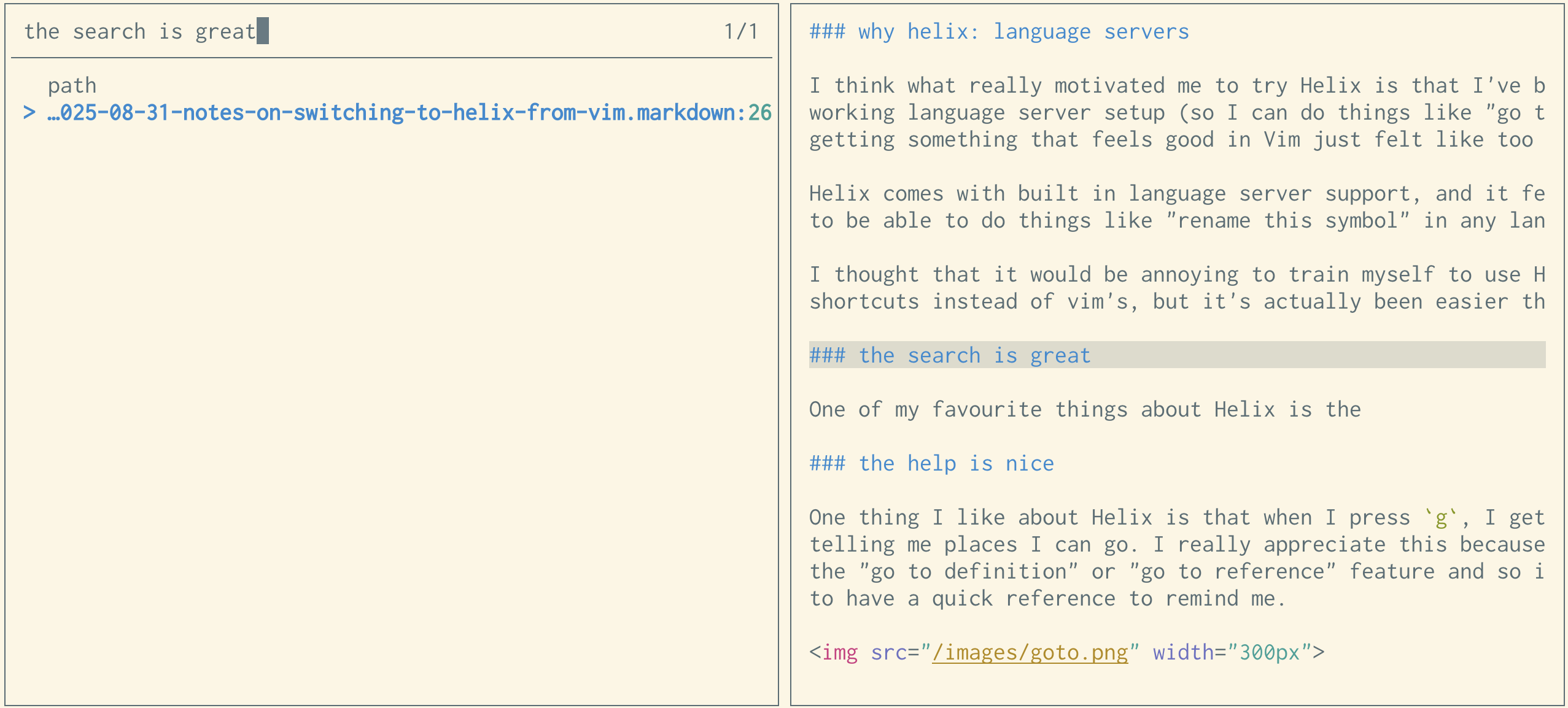
Searching across a repository is one of my favorite Helix features. When I invoke a project-wide search, Helix displays results in a pane that lets me scroll through matches while seeing the full context around each line. For example, if I search for a function name, I can review the surrounding code before jumping to a file. In contrast, the ripgrep plugin I used in Vim showed only the matched line with no surrounding context, making it harder to decide which result was relevant. Helix’s approach saves time and reduces cognitive load.
User-Friendly Keyboard Shortcuts
Helix includes a quick reference popup that appears when I press certain keys. For instance, pressing g shows a list of jump destinations like go to definition, go to reference, or go to next diagnostic. I don’t use these commands daily, so I often forget the exact shortcuts. Having a cheat sheet built into the editor is a small but thoughtful aid that prevents me from reaching for the mouse or searching the web.
Translating Vim Habits to Helix
Moving from Vim to Helix required adjusting a few ingrained habits. Here are the key differences I encountered.
Navigating Without Marks
Vim’s marks (ma, 'a) let you jump to saved positions in a file. Helix doesn’t support marks in the same way. Instead, I rely on Ctrl+O and Ctrl+I to navigate backward and forward through my cursor location history. This approach works well for quick jumps between recent spots, though it lacks the permanence of named marks.
Macros vs. Multiple Cursors
Helix does support macros, but I’ve found myself using multiple cursors almost exclusively for batch edits. For example, to change the same pattern across a document, I press % to select the entire buffer, then s to filter the selection with a regex, and finally edit all occurrences simultaneously. This workflow feels more intuitive and less error-prone than recording and replaying macros.
Buffer Management Instead of Tabs
Helix doesn’t have Neovim-style tabs, but it provides a buffer switcher (<space>b) that gives an overview of open buffers. There’s an ongoing pull request to add tabs, and meanwhile the bufferline = "multiple" setting approximates a tab bar with gp/gn for navigation and :bc to close buffers. It’s a bit different, but after some use, I appreciate the simplicity of buffer management without tab pages.
A Few Helix Annoyances
No editor is perfect, and Helix has its share of rough edges. Here’s what has bothered me so far.
- Reflow feels clunky. The
:reflowcommand in Helix doesn’t handle list items as gracefully as Vim’sgq. In markdown lists, the reflow often breaks numbered sequences or misaligns bullet points. A GitHub issue tracks this, and I hope it improves. - Missing features. Some Vim staples, like the ability to sort lines or apply external filters (
!), are absent or require workarounds in Helix. For now, I pipe text to external commands using Terminal mode, but it’s not as direct as Vim’s approach.
Despite these annoyances, the core editing experience—especially the LSP integration and search—has kept me loyal. I’m still learning new tricks, and the Helix community is active, so I expect many of these pain points will be addressed over time.